Fresh thinking for
growing businesses.
Ideas, practical guides and lessons on connecting sales, improving customer relationships and building systems that grow revenue.
HubSpot
Build a CRM: A Complete Guide for 2026
· 7 min read
Building a customer relationship management system from scratch represents one of the most strategic investments a growing business can make. When you build a CRM that aligns precisely with your revenue operations, you create a foundation for predictable growth, actionable insights, and efficient team collaboration. This comprehensive guide walks through the essential components, strategic decisions, and implementation patterns that transform a collection of customer data into a revenue-generating engine.
Understanding the Foundation: Why Build a CRM
Most businesses start their CRM journey by adopting an off-the-shelf platform. However, the decision to build a CRM or customize an existing platform requires careful strategic thinking.
The primary advantage of building custom functionality lies in perfect alignment with your unique business processes. **Your sales methodology, customer journey stages, and revenue model are not generic**. When you build a CRM architecture that mirrors these exact workflows, adoption increases and data quality improves dramatically.
Evaluating Build vs. Configure Trade-offs
Before committing resources, assess where custom development adds genuine value versus where platform configuration suffices:
**Data model complexity**: Industries with non-standard relationships (multi-party transactions, complex hierarchies) benefit from custom builds
**Integration density**: High-volume, bidirectional data flows often require API-level custom work
**Automation sophistication**: When standard workflow tools cannot handle your business logic
**Compliance requirements**: Sector-specific data residency, audit trails, or access controls
Modern platforms like HubSpot offer extensive customization through properties, workflows, and APIs. The question shifts from "should we build?" to "what specifically should we build versus configure?" This hybrid approach delivers faster time-to-value while preserving flexibility for true differentiators.

Designing Your CRM Data Architecture
Your data model forms the structural DNA of any CRM system. Poor design choices made early compound into migration nightmares, reporting blind spots, and user frustration later.
Core Object Relationships
When you build a CRM, start with the fundamental objects and their relationships. These typically include:
Object Type
Key Attributes
Primary Relationships
Contact
Name, role, communication preferences, lifecycle stage
Associated with companies, deals, tickets
Company
Industry, size, revenue, territory
Parent/child hierarchies, multiple contacts
Deal
Value, stage, close date, product mix
Owned by user, linked to company and contacts
Activity
Type, timestamp, outcome, next step
Associated with all record types
The relationships between these objects determine reporting capabilities and automation possibilities. **Design for how data flows through your actual revenue process**, not theoretical best practices. For example, if your sales process involves committee decisions with multiple stakeholders, your contact-to-deal relationship needs to support multiple decision-makers with distinct roles.
AWS provides detailed architectural guidance on [building data-driven applications for Customer 360](https://docs.aws.amazon.com/pdfs/whitepapers/latest/build-e2e-data-driven-applications/build-e2e-data-driven-applications.pdf), which applies directly to CRM data modeling challenges.
Custom Properties and Calculated Fields
Standard CRM objects provide a starting point, but custom properties capture your unique business context:
**Qualification criteria**: Budget authority, timeline, specific pain points
**Product configuration**: SKUs, add-ons, implementation complexity
**Customer health indicators**: Usage metrics, support ticket volume, expansion opportunity scores
**Operational metadata**: Data source, last enrichment date, verification status
Calculated fields derive insights automatically. Examples include deal age (days in current stage), account penetration (contacts per employee count), or weighted pipeline value (amount probability). These calculations, when built into the CRM data layer, ensure consistency across all reporting and eliminate manual spreadsheet work.
Building Automation and Workflow Logic
Automation transforms your CRM from a database into an active business system. When you build a CRM automation strategy, focus on eliminating repetitive tasks while enforcing process consistency.
Lead Routing and Assignment
Intelligent assignment ensures leads reach the right rep instantly. Build routing logic based on:
**Geographic territory**: Zip code, state, country mappings
**Account ownership**: Existing customer relationships override territory rules
**Product specialty**: Technical sales vs. commercial deals
**Capacity balancing**: Round-robin within team to distribute workload evenly
Modern routing incorporates AI scoring to prioritize high-intent leads. [Implementing AI properly](https://www.revioco.com/news/ai-automation-services) requires clean data and clear success metrics, not just activating features.
Stage Progression and Data Validation
Enforce data quality through stage-gate automation:
Prevent deal progression to "Proposal" until key fields populate (decision criteria, budget, timeline)
Trigger alerts when deals stall beyond expected stage duration
Auto-create follow-up tasks based on activity outcomes
Update contact lifecycle stages as engagement increases
This validation layer prevents "garbage in, garbage out" scenarios that plague CRM reporting. Representatives cannot mark a deal "Closed Won" until integration confirms payment processing, for example.

Integration Architecture for Connected Systems
No CRM operates in isolation. When you build a CRM integration strategy, plan for bidirectional data flow with your broader technology stack.
Critical Integration Points
System Category
Data Exchanged
Sync Pattern
Common Challenges
Marketing automation
Lead scores, campaign engagement, form submissions
Real-time inbound, batch outbound
Attribution conflicts, duplicate records
Accounting/ERP
Invoices, payments, product catalog
Scheduled batch, event-driven
Data format mismatches, timing delays
Support/ticketing
Case volume, satisfaction scores, renewal risk
Real-time bidirectional
Matching contact records, status mapping
Product/usage analytics
Feature adoption, login frequency, health scores
Daily batch summary
Privacy considerations, metric definitions
[Custom HubSpot integrations](https://www.revioco.com/news/partner-solutions) often require API-level work beyond what native connectors provide, especially for complex data transformations or high-volume scenarios. AWS offers [practical Customer 360 data strategy guidance](https://aws.amazon.com/blogs/big-data/create-an-end-to-end-data-strategy-for-customer-360-on-aws/) that addresses common integration architecture patterns.
Streaming Data and Real-Time Updates
Traditional batch integrations create data lag that impacts sales effectiveness. When a prospect downloads a whitepaper, views pricing, or attends a webinar, that signal should update the CRM immediately.
Event-driven architectures enable real-time customer data activation. As outlined in [Confluent's guide to streaming architectures](https://www.confluent.io/blog/generative-ai-meets-data-streaming-part-3/), event streams can power instant lead scoring updates, trigger timely sales alerts, and maintain synchronized customer profiles across systems.
**Real-time integration particularly matters for**:
High-velocity inside sales teams working inbound leads
Product-led growth models where usage triggers sales outreach
Renewal processes dependent on current product engagement metrics
Multi-channel customer experiences requiring consistent data
API Security and Data Governance
As you build a CRM that connects broadly, security becomes paramount. The [OWASP API Security Top 10](https://owasp.org/API-Security/editions/2023/en/0x10-api-security-risks/) provides essential guidance for protecting integration endpoints.
Key security considerations include:
**Authentication and authorization**: API keys, OAuth tokens, IP whitelisting for sensitive endpoints
**Rate limiting**: Prevent abuse and ensure fair resource allocation
**Data encryption**: TLS for data in transit, encryption at rest for sensitive fields
**Audit logging**: Track all API access, data modifications, and export activities
**Error handling**: Avoid exposing system details in error messages
Build these protections from day one rather than retrofitting after a security incident. [Common CRM mistakes](https://www.revioco.com/news/5-common-crm-mistakes-that-are-costing-your-business-revenue-and-how-to-fix-them) often stem from inadequate access controls and data governance during initial implementation.
User Experience and Adoption Strategies
The most sophisticated CRM architecture fails if users abandon it for spreadsheets. When you build a CRM, invest equally in technical capability and user experience.
Onboarding and Progressive Disclosure
Research from Nielsen Norman Group on [mobile app onboarding patterns](https://www.nngroup.com/articles/mobile-app-onboarding/) reveals principles applicable to CRM user activation:
**Contextual guidance**: Show help exactly when users encounter new features, not in a generic tour
**Quick wins**: Enable users to complete one valuable task in their first session
**Skill building**: Introduce advanced features gradually as users master basics
**Interrupt sparingly**: Avoid blocking workflows with lengthy tutorials
Apply these principles through in-app walkthroughs, role-specific training, and progressive field requirements. A new sales rep should see only essential deal fields initially, with optional advanced fields revealed as they gain experience.
Mobile-First for Field Teams
Sales representatives increasingly work from mobile devices during client visits, at events, and between meetings. Build a CRM experience that works seamlessly on smartphones:
Voice-to-text for activity logging after calls
Offline mode for viewing key customer data without connectivity
Simplified deal update forms optimized for touch interfaces
Push notifications for high-priority leads or deal updates
Mobile adoption drives data quality because reps update records immediately while context is fresh, rather than batch-entering notes hours later from memory.
Measurement Framework and Success Metrics
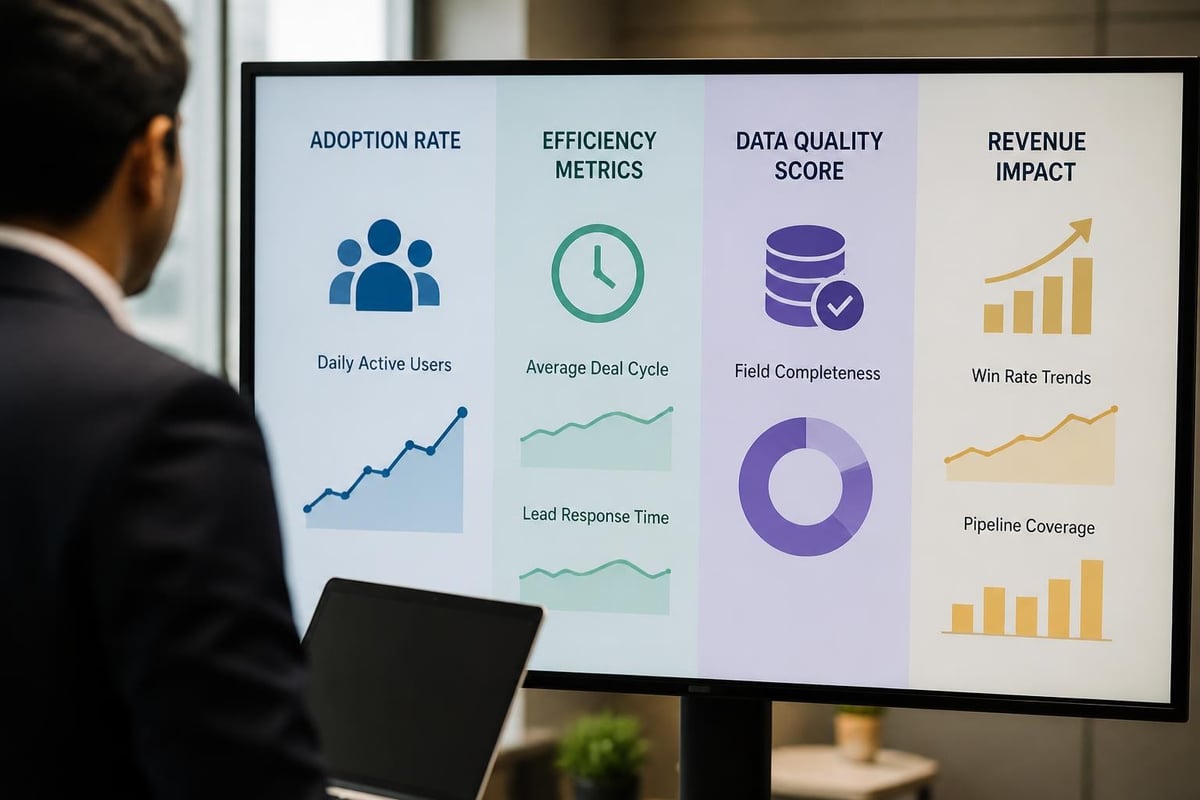
When you build a CRM, establish clear success metrics from the start. [Forrester's guidance on CRM metrics](https://www.forrester.com/report/Define-The-Right-CRM-Metrics/RES59408) helps identify KPIs that actually correlate with business outcomes.
Adoption Metrics
Track whether users actually use the system:
**Login frequency**: Daily active users by role
**Data entry completeness**: Percentage of required fields populated
**Activity logging**: Calls, emails, meetings recorded vs. actual volume
**Mobile usage**: Percentage of updates from mobile devices
Low adoption metrics signal user experience problems, insufficient training, or misalignment between CRM workflows and actual work patterns.
Process Efficiency Metrics
Measure whether the CRM accelerates revenue operations:
Metric
Calculation
Target Direction
What It Reveals
Average deal cycle
Days from create to close
Decrease
Sales process efficiency
Lead response time
Minutes from inquiry to first contact
Decrease
Speed to engage
Pipeline coverage
Weighted pipeline quota
3-4
Sales capacity planning
Forecast accuracy
Predicted vs. actual closed revenue
>90%
Data quality and judgment
These [pipeline reporting metrics](https://www.revioco.com/news/pipeline-reporting) connect CRM usage directly to revenue outcomes. When you build CRM reports around these KPIs, executive stakeholders see clear ROI rather than just user counts.
Revenue Impact Metrics
Ultimately, CRM investment must drive measurable revenue growth:
**Win rate improvement**: Closed-won deals ÷ total opportunities, trended over time
**Average deal size**: Impact of better qualification and cross-sell visibility
**Sales cycle compression**: Time savings from automation and better information access
**Customer lifetime value**: Retention and expansion tracked longitudinally
Establish baseline measurements before CRM improvements, then track quarterly to demonstrate impact. [Building effective reports](https://www.revioco.com/news/build-reports) that connect CRM data to these revenue metrics requires thoughtful data model design from the beginning.
Implementation Methodology and Change Management
The technical work to build a CRM represents only half the challenge. Successful implementation requires structured change management and stakeholder alignment.
Phased Rollout Strategy
Deploy capabilities incrementally rather than attempting a "big bang" launch:
**Phase 1 - Core data model**: Deploy contact, company, and deal objects with essential fields only
**Phase 2 - Basic automation**: Add lead routing, task creation, and stage progression logic
**Phase 3 - Integrations**: Connect marketing automation, email, and calendar systems
**Phase 4 - Advanced features**: Implement forecasting, territory management, and custom reporting
**Phase 5 - AI and optimization**: Layer in predictive scoring, conversation intelligence, and advanced analytics
This approach delivers value quickly while allowing teams to adapt gradually. Users build confidence with simpler features before encountering complexity.
Testing and Quality Assurance
Before each phase goes live, validate thoroughly:
**Unit tests**: Verify individual workflows trigger correctly with expected inputs
**Integration tests**: Confirm data flows accurately between connected systems
**User acceptance testing**: Have actual sales reps and managers test real scenarios
**Performance testing**: Ensure the system handles expected data volumes and concurrent users
**Security scanning**: Check for vulnerabilities in custom code and API endpoints
Microsoft provides helpful [CI/CD patterns for SaaS applications](https://learn.microsoft.com/en-us/devops/operate/governance-cicd) that apply when building CRM functionality. Automated testing prevents regressions as you iterate and add features.
Training and Enablement Programs
Technical training alone proves insufficient. Effective enablement connects CRM features to business outcomes:
**Role-based training**: Different curricula for sales reps, managers, operations, and executives
**Scenario-based exercises**: Practice with realistic customer situations, not abstract features
**Champions program**: Identify power users who can support peers and provide feedback
**Office hours**: Regular sessions where users can ask questions and request help
**Documentation hub**: Searchable knowledge base with written guides, videos, and FAQs
When teams understand **how** CRM usage improves their quota attainment or reduces administrative burden, adoption follows naturally. Understanding the [CRM implementation process](https://www.revioco.com/news/crm-implementation) from a strategic perspective helps align training with business goals.
Ongoing Optimization and Iteration
Launching your CRM marks the beginning, not the end. Continuous improvement based on user feedback and business evolution keeps the system valuable.
Governance and Maintenance
Establish regular cadences for CRM health:
**Weekly**: Monitor automation errors, integration failures, and data sync issues
**Monthly**: Review adoption metrics, data quality scores, and user-reported issues
**Quarterly**: Assess whether CRM configuration still matches current sales process
**Annually**: Evaluate major architectural decisions and plan strategic enhancements
Assign clear ownership for CRM administration. Whether through an internal operations hire, a fractional consultant, or dedicated vendor support, someone must own ongoing system health.
Data Hygiene and Quality Improvement
CRM data degrades over time through duplicates, outdated information, and incomplete records. Build ongoing data quality processes:
**Deduplication rules**: Automatic merging of similar records based on matching criteria
**Enrichment workflows**: Periodic updates from third-party data sources
**Validation automation**: Flag records with missing critical information
**Archival policies**: Move aged records to separate views or objects to improve performance
Clean data compounds in value. Better data enables better reporting, more accurate AI predictions, and higher user trust. Make [data cleanup](https://www.revioco.com/news/data-and-crm) a recurring operational discipline, not a one-time project.
Feedback Loops and Iteration
The best CRM systems evolve based on actual usage patterns:
Survey users quarterly about pain points and desired features
Analyze which automation workflows generate the most errors or user complaints
Track which reports get used vs. which remain untouched
Monitor support ticket themes to identify common confusion points
Build rapid iteration cycles where simple improvements ship quickly. A two-week sprint to add a requested field or adjust an automation rule demonstrates responsiveness and builds user confidence that their feedback matters.
Scaling Considerations for Growth
As your business grows, your CRM must scale along multiple dimensions. When you build a CRM architecture, anticipate these scaling challenges:
Data Volume and Performance
Small datasets forgive inefficient queries and complex automations. At scale, performance optimization becomes critical:
Index frequently queried fields to speed searches and reports
Archive historical data that no longer drives active decisions
Batch processing for high-volume operations instead of real-time triggers
Caching strategies for commonly accessed reference data
Team Structure and Access Control
Growing teams require sophisticated permission models:
**Role hierarchies**: Managers see their team's data; directors see multiple teams; executives see everything
**Sharing rules**: Cross-functional visibility where needed (customer success seeing sales deals)
**Field-level security**: Sensitive compensation or margin data restricted to specific roles
**IP restrictions**: Require VPN or office IP for accessing certain data externally
Multi-Region and Localization
Geographic expansion introduces complexity:
Time zone handling for scheduling and activity timestamps
Currency conversion for deal values and quotas
Language localization for user interface and customer-facing outputs
Regional compliance (GDPR, CCPA, industry-specific regulations)
Plan for these requirements early, even if you operate in a single region today. Retrofitting internationalization proves far more expensive than building it from the start.
—-
Building an effective CRM system requires balancing technical architecture, user experience, business process alignment, and ongoing governance. The investment pays dividends through improved sales efficiency, better customer insights, and predictable revenue growth when executed strategically. [Revio](https://revioco.com) specializes in helping businesses implement and optimize HubSpot CRM systems with the automation, integration, and AI capabilities that drive measurable results. Whether you're starting fresh or fixing an underperforming system, expert guidance ensures your CRM becomes a revenue asset rather than an administrative burden.
Put good ideas to work in your business.
We build practical AI systems around your customers, your team and the work that helps your business grow.