Fresh thinking for
growing businesses.
Ideas, practical guides and lessons on connecting sales, improving customer relationships and building systems that grow revenue.
HubSpot
Build Your Own CRM System: A Complete Guide for 2026
· 8 min read
Building a customer relationship management system from the ground up represents both an opportunity and a challenge for modern businesses. The decision to build your own CRM system stems from unique operational needs that off-the-shelf solutions cannot adequately address. Whether you're handling complex sales processes, managing specialized data requirements, or integrating with proprietary tools, custom CRM development offers unprecedented control over your business operations. This comprehensive guide explores the strategic considerations, technical approaches, and practical implementation steps necessary to create a CRM system tailored specifically to your organization's workflow. ## Understanding the Strategic Case for Custom CRM Development The decision to build your own CRM system requires careful evaluation of your business context. Organizations typically pursue custom development when facing significant limitations with existing platforms or when their processes demand unique functionality that standard solutions cannot provide. ### When Custom Development Makes Business Sense **Market-leading CRM platforms** like HubSpot, Salesforce, and Microsoft Dynamics serve the vast majority of businesses effectively. However, specific scenarios justify custom development: - **Highly specialized industry requirements** that standard platforms cannot accommodate without extensive workarounds - **Complex data relationships** spanning multiple entities beyond typical contact-company-deal structures - **Proprietary workflows** that represent competitive advantages and require precise implementation - **Legacy system integration needs** that exceed the capabilities of standard API connectors - **Strict compliance requirements** demanding complete data sovereignty and custom security protocols Custom CRM development typically costs between $50,000 and $500,000 depending on complexity, with ongoing maintenance representing 15-20% of initial development costs annually. [Building a custom CRM system](https://www.mindinventory.com/blog/how-to-create-custom-crm/) requires thorough cost-benefit analysis against platform subscription fees, which typically range from $50-150 per user monthly.  ### Assessing Your Technical Capacity and Resources Before committing to custom development, evaluate your organization's technical infrastructure and human resources honestly. Successful custom CRM projects require sustained technical investment beyond initial development. Resource Requirement In-House Development Outsourced Development Hybrid Approach Development Team 3-5 full-time developers Contract management 1-2 internal + agency Timeline 8-12 months MVP 4-6 months MVP 6-9 months MVP Technical Expertise Deep technical team Vendor selection skills Mixed capabilities Ongoing Maintenance Permanent staff Retainer agreements Split responsibilities Cost Control Salary overhead Fixed project fees Balanced approach Organizations lacking dedicated technical teams often underestimate the ongoing maintenance burden. Your custom CRM will require continuous updates for security patches, feature enhancements, and integration maintenance as third-party systems evolve. ## Mapping Your CRM Requirements and Architecture Successful CRM development begins with comprehensive requirements gathering and system architecture planning. [Understanding how to build a CRM system from scratch](https://www.zite.com/blog/how-to-build-a-crm-system-from-scratch) requires mapping your sales processes before writing a single line of code. ### Defining Core Data Models and Relationships Your CRM's data architecture forms the foundation of every feature you'll build. Start by identifying the core entities your system must track and their relationships. **Essential data entities** include: - **Contacts and accounts** with custom fields matching your qualification criteria - **Opportunity or deal records** reflecting your specific sales stages - **Activity tracking** for emails, calls, meetings, and custom touchpoints - **Product or service catalog** with pricing structures and configurations - **Support tickets or service records** if managing post-sale relationships Beyond basic entities, define the relationships between them. Map out how contacts associate with accounts, how opportunities link to contacts and products, and how activities connect across all entities. This relational mapping directly translates into your database schema design. ### Documenting Workflow and Automation Requirements Effective CRM systems automate repetitive tasks and enforce process consistency. Document every workflow your sales, marketing, and service teams currently execute manually. **Critical workflow categories:** - Lead assignment and routing based on territory, product line, or capacity - Deal stage progression triggers and required fields for advancement - Automated follow-up sequences based on activity or time elapsed - Notification and escalation rules for stuck deals or aging leads - Data validation and enrichment processes for maintaining record quality [Building robust automation](https://www.revioco.com/news/pipeline-solutions) requires understanding not just what happens in each workflow, but the business logic governing when and why it triggers. This specification becomes your automation development roadmap. ## Choosing Your Development Approach The decision to build your own CRM system presents multiple technical pathways, each with distinct trade-offs in flexibility, cost, and development speed. Your choice significantly impacts both initial delivery and long-term maintainability. ### Custom Code Development from Scratch Building a CRM system through pure code development offers maximum flexibility and control. This approach suits organizations with specific technical requirements that no platform can accommodate. **Technology stack considerations:** - **Backend frameworks** like Django, Ruby on Rails, or Node.js/Express for application logic - **Frontend frameworks** such as React, Vue, or Angular for user interfaces - **Database systems** including PostgreSQL for relational data or MongoDB for document storage - **Cloud infrastructure** on AWS, Google Cloud, or Azure for hosting and scaling - **API layer design** for third-party integrations and mobile applications This approach demands significant technical expertise but delivers complete architectural control. Development typically requires 6-12 months for a minimum viable product, with costs ranging from $100,000-500,000 depending on feature complexity. [Custom CRM development from scratch](https://onix-systems.com/blog/build-your-own-crm-system) provides the deepest customization but carries the highest risk and resource requirements. ### No-Code and Low-Code Platform Approaches No-code platforms like Airtable, Notion, or Fibery offer rapid CRM development without programming expertise. Low-code platforms such as Mendix, OutSystems, or Microsoft Power Apps provide visual development with custom code capabilities when needed. Platform Type Best For Limitations Typical Cost No-Code Simple workflows, small teams Limited customization, scaling issues $20-50/user/month Low-Code Moderate complexity, some custom logic Platform lock-in, eventual ceiling $50-100/user/month Custom Code Complex requirements, full control High development cost, maintenance burden $100K+ initial These platforms accelerate initial development but may create technical debt as requirements evolve. Teams often hit platform limitations after 12-18 months, requiring migration to more robust solutions. 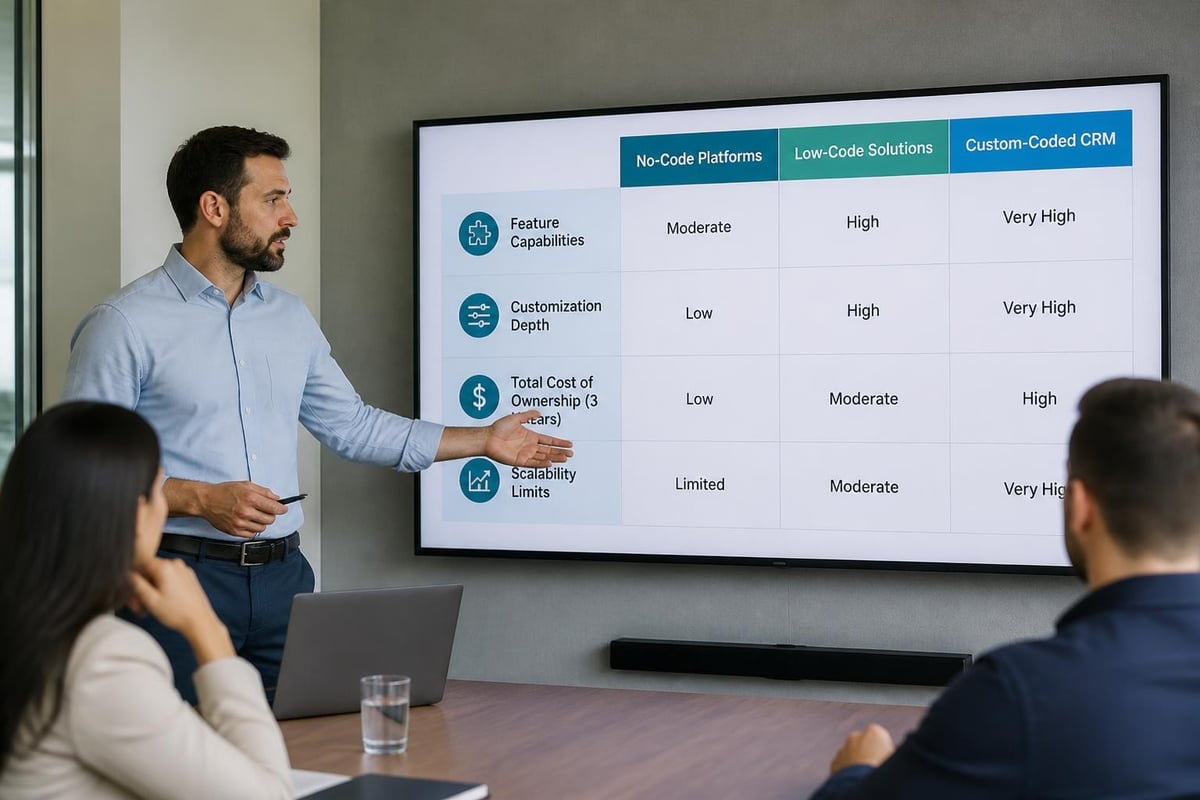 ### Open-Source CRM Foundations Open-source CRM platforms like SuiteCRM, EspoCRM, or Odoo provide pre-built functionality with customization capabilities. [Leveraging open-source solutions](https://customermates.com/en/blog/build-your-own-crm) reduces initial development time while maintaining modification flexibility. **Open-source advantages:** - Pre-built core CRM features reduce development time by 60-70% - Active community support and regular security updates - Full code access enables unlimited customization - Lower licensing costs compared to commercial platforms **Implementation considerations:** - Requires technical expertise to customize and maintain - Community support lacks guaranteed SLAs - Upgrading customized instances creates technical challenges - Security responsibility rests entirely with your organization ## Implementing Core CRM Functionality Regardless of your development approach, certain core features form the foundation of every effective CRM system. Prioritize these capabilities in your initial build to deliver immediate value. ### Contact and Account Management Your CRM must serve as the definitive source of truth for customer information. Design contact and account management with data quality and usability as primary objectives. **Essential contact management features:** - **Flexible data fields** accommodating your specific qualification and segmentation criteria - **Duplicate detection and merging** preventing database pollution - **Contact-to-account relationships** supporting complex organizational hierarchies - **Activity timeline views** showing complete interaction history - **Custom properties and tags** enabling precise segmentation Implement strong data validation at the input level. Required fields, format validation, and picklist values prevent garbage data from entering your system. Plan for data import and export capabilities supporting standard formats like CSV and Excel. ### Pipeline and Opportunity Tracking Deal pipeline management represents core CRM functionality for sales organizations. Your pipeline structure should mirror your actual sales process, not generic templates. **Pipeline configuration requirements:** - Custom deal stages matching your qualification and closing process - Weighted probability calculations for accurate forecasting - Deal aging alerts identifying opportunities requiring attention - Multiple pipelines supporting different product lines or sale types - Custom fields capturing deal-specific information like competition, budget authority, timeline Design pipeline views providing both individual deal detail and aggregate pipeline health. Sales representatives need granular deal information, while managers require high-level metrics showing pipeline velocity, conversion rates, and forecast accuracy. [Understanding pipeline velocity metrics](https://www.revioco.com/news/pipeline-velocity) helps design reporting that actually drives performance. ### Reporting and Analytics Framework Custom CRM systems fail when they cannot answer critical business questions through clear reporting. Build analytics capabilities from day one rather than treating reporting as an afterthought. **Core reporting requirements include:** - Revenue dashboards showing actual versus forecasted performance - Activity reports measuring team productivity and engagement levels - Conversion analytics tracking movement through pipeline stages - Win/loss analysis identifying patterns in successful and failed deals - Custom report builders enabling users to create ad-hoc analyses Consider implementing embedded business intelligence tools like Metabase, Superset, or commercial solutions like Tableau for advanced analytics. These platforms connect to your CRM database and provide sophisticated visualization without custom development. [Building effective reports](https://www.revioco.com/news/build-reports) requires understanding what metrics actually drive decision-making in your organization. ## Integrating Your CRM with Existing Systems An isolated CRM system delivers limited value. Your custom CRM must connect seamlessly with existing tools across your technology stack to create unified workflows. ### Email and Communication Platform Integration Email represents the primary communication channel for most business relationships. Your CRM must capture and display email interactions within contact and deal records. **Email integration approaches:** - **Direct IMAP/SMTP connection** for full control but requires email server access - **API integrations** with Gmail, Outlook, or Google Workspace for OAuth-based access - **Third-party services** like Nylas or SendGrid providing abstraction layers - **Browser extensions** enabling manual email logging when automatic capture isn't feasible Beyond email, consider integration requirements for phone systems, chat platforms, and video conferencing tools. Each communication channel your team uses should feed activity data into your CRM automatically. ### Marketing and Lead Generation Tool Connections Lead flow from marketing campaigns into your CRM determines sales pipeline health. Build reliable connections between advertising platforms, website forms, and your CRM database. **Common integration points:** - **Landing page builders** like Unbounce or Instapage for form submissions - **Marketing automation platforms** for lead nurturing handoffs - **Advertising platforms** including Google Ads, LinkedIn, and Facebook for lead form data - **Website chat tools** capturing conversations as lead records - **Event platforms** adding webinar attendees or conference contacts Implement proper lead deduplication logic preventing multiple records for single prospects. When receiving leads from multiple sources, define clear prioritization rules determining which source data takes precedence in conflicts. ### Financial and Operational System Synchronization Revenue operations require tight integration between CRM deal data and financial systems. Winning a deal in your CRM should trigger downstream processes in billing, fulfillment, and accounting systems.  **Critical financial integrations:** - Invoicing and billing platforms like Stripe, QuickBooks, or NetSuite - Contract management systems for legal document workflows - Payment processors for transaction tracking and reconciliation - Revenue recognition tools for proper accounting treatment - Data warehouses for enterprise analytics and reporting These integrations often require sophisticated error handling and retry logic. Financial data must maintain perfect accuracy, demanding robust integration architecture beyond simple API calls. ## Managing Data Quality and Governance Data quality determines CRM effectiveness more than feature sophistication. Build data governance processes into your custom system from the beginning rather than attempting cleanup later. ### Establishing Data Entry Standards Inconsistent data entry creates unusable databases. Define and enforce standards for how information enters your CRM system. **Data governance best practices:** - Required field validation preventing incomplete records - Picklist values standardizing categorical data entry - Format validation for phone numbers, email addresses, and postal codes - Character limits preventing overly verbose or truncated data - Default values reducing manual entry burden while ensuring completeness Train users on data entry standards and build these standards into system design. Well-designed interfaces guide users toward correct data entry through smart defaults and clear field labeling. ### Implementing Deduplication and Data Hygiene Even with strong entry validation, duplicate records accumulate over time. Implement automated deduplication processes identifying and merging duplicate contacts, accounts, and deals. Deduplication Method Accuracy Speed Best For Exact Email Match 95% Very Fast Initial cleanup Fuzzy Name Matching 70% Moderate Similar name variants Company Domain Matching 85% Fast Business contacts Manual Review Queue 99% Slow Final validation ML-Based Similarity 80-90% Fast Large databases Schedule regular data hygiene processes removing obsolete records, updating outdated information, and validating contact details. Many businesses using HubSpot benefit from [ongoing HubSpot support](https://revioco.com) managing these critical data hygiene tasks. ## Scaling and Maintaining Your Custom CRM Building your initial CRM system represents just the beginning of your custom development journey. Long-term success requires planning for scale, maintenance, and continuous improvement. ### Performance Optimization for Growth As your database grows from thousands to hundreds of thousands of records, performance optimization becomes critical. Design for scale from day one rather than retrofitting performance improvements later. **Scalability considerations:** - Database indexing on frequently queried fields - Caching layers for commonly accessed data - Query optimization reducing database load - Asynchronous processing for heavy operations - Load balancing across multiple application servers Monitor system performance metrics continuously. Response time degradation often indicates underlying architectural issues requiring attention before they impact user experience. ### Security and Compliance Requirements Custom CRM systems handling customer data must meet stringent security and privacy requirements. Implement security at every architectural layer rather than treating it as an afterthought. **Essential security measures include:** - Role-based access control limiting data visibility by user role - Field-level permissions protecting sensitive information - Audit logging tracking all data access and modifications - Encryption for data at rest and in transit - Regular security assessments and penetration testing - GDPR, CCPA, and industry-specific compliance requirements Security vulnerabilities in custom applications create significant business risk. Budget for regular security audits and immediate patch deployment when vulnerabilities emerge. ### Continuous Improvement and Feature Development Your business requirements evolve continuously. Build processes for gathering user feedback, prioritizing enhancements, and deploying updates without disrupting operations. **Effective change management requires:** - Regular user feedback sessions identifying pain points - Feature request tracking and prioritization frameworks - Development sprints addressing highest-priority needs - Staged rollout procedures testing changes with pilot groups - Clear communication about upcoming changes and new capabilities [Deploying AI capabilities](https://www.revioco.com/news/deploy-ai) represents one area where continuous improvement delivers substantial value. As AI technologies mature, integrating intelligent features like automated data entry, predictive scoring, and smart recommendations keeps your CRM competitive. ## Evaluating Build Versus Buy Decisions After understanding what building your own CRM system requires, many organizations reconsider whether custom development truly serves their needs better than adopting a platform solution. ### Total Cost of Ownership Analysis Compare the complete financial picture across a five-year horizon, not just initial development costs. [Detailed cost breakdowns](https://intelytics.co/blogs/build-your-own-crm) reveal hidden expenses in both custom and platform approaches. **Custom CRM cost components:** - Initial development: $100,000-500,000 - Annual maintenance: 15-20% of development cost - Feature enhancements: $50,000-150,000 annually - Hosting and infrastructure: $10,000-50,000 annually - Security and compliance: $20,000-75,000 annually **Platform CRM costs:** - Per-user licensing: $1,200-1,800 annually per user - Implementation and configuration: $20,000-100,000 - Integration development: $10,000-50,000 - Ongoing support and optimization: $12,000-36,000 annually - Additional add-ons and features: Variable For most small to mid-sized businesses, platform solutions deliver better ROI. Custom development makes financial sense primarily when platform limitations genuinely restrict core business operations. ### Platform Customization as Middle Ground Modern CRM platforms offer extensive customization capabilities through custom objects, workflows, and integrations. Before committing to full custom development, [explore platform customization options](https://monday.com/blog/crm-and-sales/build-your-own-crm/) that might address your specific requirements. **Platform customization benefits:** - 70-80% faster implementation than custom development - Built-in security, compliance, and scaling infrastructure - Regular feature updates without development investment - Extensive integration ecosystems reducing custom connector development - Established user communities and knowledge bases Platforms like HubSpot provide custom object creation, workflow automation, and API access enabling sophisticated customization without building from scratch. Many organizations find this middle path delivers the customization they need without the burden of complete custom development. --- Building a custom CRM system demands significant resources, technical expertise, and long-term commitment beyond initial development. For most businesses, platform solutions with strategic customization deliver better outcomes than starting from scratch. If you're evaluating CRM options or struggling with implementation complexity, [Revio](https://revioco.com)
Building a customer relationship management system from the ground up represents both an opportunity and a challenge for modern businesses. The decision to build your own CRM system stems from unique operational needs that off-the-shelf solutions cannot adequately address. Whether you're handling complex sales processes, managing specialized data requirements, or integrating with proprietary tools, custom CRM development offers unprecedented control over your business operations. This comprehensive guide explores the strategic considerations, technical approaches, and practical implementation steps necessary to create a CRM system tailored specifically to your organization's workflow. ## Understanding the Strategic Case for Custom CRM Development The decision to build your own CRM system requires careful evaluation of your business context. Organizations typically pursue custom development when facing significant limitations with existing platforms or when their processes demand unique functionality that standard solutions cannot provide. ### When Custom Development Makes Business Sense **Market-leading CRM platforms** like HubSpot, Salesforce, and Microsoft Dynamics serve the vast majority of businesses effectively. However, specific scenarios justify custom development: - **Highly specialized industry requirements** that standard platforms cannot accommodate without extensive workarounds - **Complex data relationships** spanning multiple entities beyond typical contact-company-deal structures - **Proprietary workflows** that represent competitive advantages and require precise implementation - **Legacy system integration needs** that exceed the capabilities of standard API connectors - **Strict compliance requirements** demanding complete data sovereignty and custom security protocols Custom CRM development typically costs between $50,000 and $500,000 depending on complexity, with ongoing maintenance representing 15-20% of initial development costs annually. [Building a custom CRM system](https://www.mindinventory.com/blog/how-to-create-custom-crm/) requires thorough cost-benefit analysis against platform subscription fees, which typically range from $50-150 per user monthly.  ### Assessing Your Technical Capacity and Resources Before committing to custom development, evaluate your organization's technical infrastructure and human resources honestly. Successful custom CRM projects require sustained technical investment beyond initial development. Resource Requirement In-House Development Outsourced Development Hybrid Approach Development Team 3-5 full-time developers Contract management 1-2 internal + agency Timeline 8-12 months MVP 4-6 months MVP 6-9 months MVP Technical Expertise Deep technical team Vendor selection skills Mixed capabilities Ongoing Maintenance Permanent staff Retainer agreements Split responsibilities Cost Control Salary overhead Fixed project fees Balanced approach Organizations lacking dedicated technical teams often underestimate the ongoing maintenance burden. Your custom CRM will require continuous updates for security patches, feature enhancements, and integration maintenance as third-party systems evolve. ## Mapping Your CRM Requirements and Architecture Successful CRM development begins with comprehensive requirements gathering and system architecture planning. [Understanding how to build a CRM system from scratch](https://www.zite.com/blog/how-to-build-a-crm-system-from-scratch) requires mapping your sales processes before writing a single line of code. ### Defining Core Data Models and Relationships Your CRM's data architecture forms the foundation of every feature you'll build. Start by identifying the core entities your system must track and their relationships. **Essential data entities** include: - **Contacts and accounts** with custom fields matching your qualification criteria - **Opportunity or deal records** reflecting your specific sales stages - **Activity tracking** for emails, calls, meetings, and custom touchpoints - **Product or service catalog** with pricing structures and configurations - **Support tickets or service records** if managing post-sale relationships Beyond basic entities, define the relationships between them. Map out how contacts associate with accounts, how opportunities link to contacts and products, and how activities connect across all entities. This relational mapping directly translates into your database schema design. ### Documenting Workflow and Automation Requirements Effective CRM systems automate repetitive tasks and enforce process consistency. Document every workflow your sales, marketing, and service teams currently execute manually. **Critical workflow categories:** - Lead assignment and routing based on territory, product line, or capacity - Deal stage progression triggers and required fields for advancement - Automated follow-up sequences based on activity or time elapsed - Notification and escalation rules for stuck deals or aging leads - Data validation and enrichment processes for maintaining record quality [Building robust automation](https://www.revioco.com/news/pipeline-solutions) requires understanding not just what happens in each workflow, but the business logic governing when and why it triggers. This specification becomes your automation development roadmap. ## Choosing Your Development Approach The decision to build your own CRM system presents multiple technical pathways, each with distinct trade-offs in flexibility, cost, and development speed. Your choice significantly impacts both initial delivery and long-term maintainability. ### Custom Code Development from Scratch Building a CRM system through pure code development offers maximum flexibility and control. This approach suits organizations with specific technical requirements that no platform can accommodate. **Technology stack considerations:** - **Backend frameworks** like Django, Ruby on Rails, or Node.js/Express for application logic - **Frontend frameworks** such as React, Vue, or Angular for user interfaces - **Database systems** including PostgreSQL for relational data or MongoDB for document storage - **Cloud infrastructure** on AWS, Google Cloud, or Azure for hosting and scaling - **API layer design** for third-party integrations and mobile applications This approach demands significant technical expertise but delivers complete architectural control. Development typically requires 6-12 months for a minimum viable product, with costs ranging from $100,000-500,000 depending on feature complexity. [Custom CRM development from scratch](https://onix-systems.com/blog/build-your-own-crm-system) provides the deepest customization but carries the highest risk and resource requirements. ### No-Code and Low-Code Platform Approaches No-code platforms like Airtable, Notion, or Fibery offer rapid CRM development without programming expertise. Low-code platforms such as Mendix, OutSystems, or Microsoft Power Apps provide visual development with custom code capabilities when needed. Platform Type Best For Limitations Typical Cost No-Code Simple workflows, small teams Limited customization, scaling issues $20-50/user/month Low-Code Moderate complexity, some custom logic Platform lock-in, eventual ceiling $50-100/user/month Custom Code Complex requirements, full control High development cost, maintenance burden $100K+ initial These platforms accelerate initial development but may create technical debt as requirements evolve. Teams often hit platform limitations after 12-18 months, requiring migration to more robust solutions.  ### Open-Source CRM Foundations Open-source CRM platforms like SuiteCRM, EspoCRM, or Odoo provide pre-built functionality with customization capabilities. [Leveraging open-source solutions](https://customermates.com/en/blog/build-your-own-crm) reduces initial development time while maintaining modification flexibility. **Open-source advantages:** - Pre-built core CRM features reduce development time by 60-70% - Active community support and regular security updates - Full code access enables unlimited customization - Lower licensing costs compared to commercial platforms **Implementation considerations:** - Requires technical expertise to customize and maintain - Community support lacks guaranteed SLAs - Upgrading customized instances creates technical challenges - Security responsibility rests entirely with your organization ## Implementing Core CRM Functionality Regardless of your development approach, certain core features form the foundation of every effective CRM system. Prioritize these capabilities in your initial build to deliver immediate value. ### Contact and Account Management Your CRM must serve as the definitive source of truth for customer information. Design contact and account management with data quality and usability as primary objectives. **Essential contact management features:** - **Flexible data fields** accommodating your specific qualification and segmentation criteria - **Duplicate detection and merging** preventing database pollution - **Contact-to-account relationships** supporting complex organizational hierarchies - **Activity timeline views** showing complete interaction history - **Custom properties and tags** enabling precise segmentation Implement strong data validation at the input level. Required fields, format validation, and picklist values prevent garbage data from entering your system. Plan for data import and export capabilities supporting standard formats like CSV and Excel. ### Pipeline and Opportunity Tracking Deal pipeline management represents core CRM functionality for sales organizations. Your pipeline structure should mirror your actual sales process, not generic templates. **Pipeline configuration requirements:** - Custom deal stages matching your qualification and closing process - Weighted probability calculations for accurate forecasting - Deal aging alerts identifying opportunities requiring attention - Multiple pipelines supporting different product lines or sale types - Custom fields capturing deal-specific information like competition, budget authority, timeline Design pipeline views providing both individual deal detail and aggregate pipeline health. Sales representatives need granular deal information, while managers require high-level metrics showing pipeline velocity, conversion rates, and forecast accuracy. [Understanding pipeline velocity metrics](https://www.revioco.com/news/pipeline-velocity) helps design reporting that actually drives performance. ### Reporting and Analytics Framework Custom CRM systems fail when they cannot answer critical business questions through clear reporting. Build analytics capabilities from day one rather than treating reporting as an afterthought. **Core reporting requirements include:** - Revenue dashboards showing actual versus forecasted performance - Activity reports measuring team productivity and engagement levels - Conversion analytics tracking movement through pipeline stages - Win/loss analysis identifying patterns in successful and failed deals - Custom report builders enabling users to create ad-hoc analyses Consider implementing embedded business intelligence tools like Metabase, Superset, or commercial solutions like Tableau for advanced analytics. These platforms connect to your CRM database and provide sophisticated visualization without custom development. [Building effective reports](https://www.revioco.com/news/build-reports) requires understanding what metrics actually drive decision-making in your organization. ## Integrating Your CRM with Existing Systems An isolated CRM system delivers limited value. Your custom CRM must connect seamlessly with existing tools across your technology stack to create unified workflows. ### Email and Communication Platform Integration Email represents the primary communication channel for most business relationships. Your CRM must capture and display email interactions within contact and deal records. **Email integration approaches:** - **Direct IMAP/SMTP connection** for full control but requires email server access - **API integrations** with Gmail, Outlook, or Google Workspace for OAuth-based access - **Third-party services** like Nylas or SendGrid providing abstraction layers - **Browser extensions** enabling manual email logging when automatic capture isn't feasible Beyond email, consider integration requirements for phone systems, chat platforms, and video conferencing tools. Each communication channel your team uses should feed activity data into your CRM automatically. ### Marketing and Lead Generation Tool Connections Lead flow from marketing campaigns into your CRM determines sales pipeline health. Build reliable connections between advertising platforms, website forms, and your CRM database. **Common integration points:** - **Landing page builders** like Unbounce or Instapage for form submissions - **Marketing automation platforms** for lead nurturing handoffs - **Advertising platforms** including Google Ads, LinkedIn, and Facebook for lead form data - **Website chat tools** capturing conversations as lead records - **Event platforms** adding webinar attendees or conference contacts Implement proper lead deduplication logic preventing multiple records for single prospects. When receiving leads from multiple sources, define clear prioritization rules determining which source data takes precedence in conflicts. ### Financial and Operational System Synchronization Revenue operations require tight integration between CRM deal data and financial systems. Winning a deal in your CRM should trigger downstream processes in billing, fulfillment, and accounting systems.  **Critical financial integrations:** - Invoicing and billing platforms like Stripe, QuickBooks, or NetSuite - Contract management systems for legal document workflows - Payment processors for transaction tracking and reconciliation - Revenue recognition tools for proper accounting treatment - Data warehouses for enterprise analytics and reporting These integrations often require sophisticated error handling and retry logic. Financial data must maintain perfect accuracy, demanding robust integration architecture beyond simple API calls. ## Managing Data Quality and Governance Data quality determines CRM effectiveness more than feature sophistication. Build data governance processes into your custom system from the beginning rather than attempting cleanup later. ### Establishing Data Entry Standards Inconsistent data entry creates unusable databases. Define and enforce standards for how information enters your CRM system. **Data governance best practices:** - Required field validation preventing incomplete records - Picklist values standardizing categorical data entry - Format validation for phone numbers, email addresses, and postal codes - Character limits preventing overly verbose or truncated data - Default values reducing manual entry burden while ensuring completeness Train users on data entry standards and build these standards into system design. Well-designed interfaces guide users toward correct data entry through smart defaults and clear field labeling. ### Implementing Deduplication and Data Hygiene Even with strong entry validation, duplicate records accumulate over time. Implement automated deduplication processes identifying and merging duplicate contacts, accounts, and deals. Deduplication Method Accuracy Speed Best For Exact Email Match 95% Very Fast Initial cleanup Fuzzy Name Matching 70% Moderate Similar name variants Company Domain Matching 85% Fast Business contacts Manual Review Queue 99% Slow Final validation ML-Based Similarity 80-90% Fast Large databases Schedule regular data hygiene processes removing obsolete records, updating outdated information, and validating contact details. Many businesses using HubSpot benefit from [ongoing HubSpot support](https://revioco.com) managing these critical data hygiene tasks. ## Scaling and Maintaining Your Custom CRM Building your initial CRM system represents just the beginning of your custom development journey. Long-term success requires planning for scale, maintenance, and continuous improvement. ### Performance Optimization for Growth As your database grows from thousands to hundreds of thousands of records, performance optimization becomes critical. Design for scale from day one rather than retrofitting performance improvements later. **Scalability considerations:** - Database indexing on frequently queried fields - Caching layers for commonly accessed data - Query optimization reducing database load - Asynchronous processing for heavy operations - Load balancing across multiple application servers Monitor system performance metrics continuously. Response time degradation often indicates underlying architectural issues requiring attention before they impact user experience. ### Security and Compliance Requirements Custom CRM systems handling customer data must meet stringent security and privacy requirements. Implement security at every architectural layer rather than treating it as an afterthought. **Essential security measures include:** - Role-based access control limiting data visibility by user role - Field-level permissions protecting sensitive information - Audit logging tracking all data access and modifications - Encryption for data at rest and in transit - Regular security assessments and penetration testing - GDPR, CCPA, and industry-specific compliance requirements Security vulnerabilities in custom applications create significant business risk. Budget for regular security audits and immediate patch deployment when vulnerabilities emerge. ### Continuous Improvement and Feature Development Your business requirements evolve continuously. Build processes for gathering user feedback, prioritizing enhancements, and deploying updates without disrupting operations. **Effective change management requires:** - Regular user feedback sessions identifying pain points - Feature request tracking and prioritization frameworks - Development sprints addressing highest-priority needs - Staged rollout procedures testing changes with pilot groups - Clear communication about upcoming changes and new capabilities [Deploying AI capabilities](https://www.revioco.com/news/deploy-ai) represents one area where continuous improvement delivers substantial value. As AI technologies mature, integrating intelligent features like automated data entry, predictive scoring, and smart recommendations keeps your CRM competitive. ## Evaluating Build Versus Buy Decisions After understanding what building your own CRM system requires, many organizations reconsider whether custom development truly serves their needs better than adopting a platform solution. ### Total Cost of Ownership Analysis Compare the complete financial picture across a five-year horizon, not just initial development costs. [Detailed cost breakdowns](https://intelytics.co/blogs/build-your-own-crm) reveal hidden expenses in both custom and platform approaches. **Custom CRM cost components:** - Initial development: $100,000-500,000 - Annual maintenance: 15-20% of development cost - Feature enhancements: $50,000-150,000 annually - Hosting and infrastructure: $10,000-50,000 annually - Security and compliance: $20,000-75,000 annually **Platform CRM costs:** - Per-user licensing: $1,200-1,800 annually per user - Implementation and configuration: $20,000-100,000 - Integration development: $10,000-50,000 - Ongoing support and optimization: $12,000-36,000 annually - Additional add-ons and features: Variable For most small to mid-sized businesses, platform solutions deliver better ROI. Custom development makes financial sense primarily when platform limitations genuinely restrict core business operations. ### Platform Customization as Middle Ground Modern CRM platforms offer extensive customization capabilities through custom objects, workflows, and integrations. Before committing to full custom development, [explore platform customization options](https://monday.com/blog/crm-and-sales/build-your-own-crm/) that might address your specific requirements. **Platform customization benefits:** - 70-80% faster implementation than custom development - Built-in security, compliance, and scaling infrastructure - Regular feature updates without development investment - Extensive integration ecosystems reducing custom connector development - Established user communities and knowledge bases Platforms like HubSpot provide custom object creation, workflow automation, and API access enabling sophisticated customization without building from scratch. Many organizations find this middle path delivers the customization they need without the burden of complete custom development. --- Building a custom CRM system demands significant resources, technical expertise, and long-term commitment beyond initial development. For most businesses, platform solutions with strategic customization deliver better outcomes than starting from scratch. If you're evaluating CRM options or struggling with implementation complexity, [Revio](https://revioco.com)
Put good ideas to work in your business.
We build practical AI systems around your customers, your team and the work that helps your business grow.