Fresh thinking for
growing businesses.
Ideas, practical guides and lessons on connecting sales, improving customer relationships and building systems that grow revenue.
AI
Code Automation: A Complete Guide for 2026
· 8 min read
Code automation has evolved from a specialized practice into a fundamental pillar of modern software development. Organizations across industries are leveraging automated workflows to eliminate repetitive tasks, reduce human error, and accelerate delivery cycles. In 2026, the convergence of artificial intelligence, DevSecOps practices, and cloud-native architectures has expanded the possibilities for automation beyond what many teams thought possible just a few years ago. Understanding how to implement effective code automation strategies can mean the difference between maintaining competitive velocity and falling behind in an increasingly fast-paced market.
Understanding Code Automation in Modern Development
Code automation encompasses any process that reduces or eliminates manual intervention in software development, testing, deployment, and maintenance. Rather than developers manually compiling code, running tests, or pushing updates to production, automated systems handle these tasks based on predefined triggers and conditions.
The scope of code automation extends across the entire software development lifecycle. **Build automation** compiles source code into executable artifacts without manual commands. **Test automation** executes unit tests, integration tests, and end-to-end scenarios to validate functionality. **Deployment automation** moves code through staging environments to production with minimal human oversight. **Infrastructure automation** provisions and configures servers, databases, and networking components through code rather than manual setup.
Modern development teams treat automation as infrastructure itself. Organizations adopting [GitOps practices](https://www.cncf.io/blog/2025/06/09/gitops-in-2025-from-old-school-updates-to-the-modern-way/) declare their entire system state in version-controlled repositories, allowing automated reconciliation loops to maintain desired configurations across environments.
The Business Case for Automation
Quantifying automation's impact reveals compelling business outcomes. According to the [CNCF Annual Survey](https://www.cncf.io/wp-content/uploads/2025/04/cncf_annual_survey24_031225a.pdf), organizations with mature CI/CD practices deploy code 208 times more frequently than low performers while maintaining superior stability and security postures.
**Key business benefits include:**
Reduced time-to-market through faster release cycles
Lower operational costs by minimizing manual intervention
Improved software quality via consistent testing and validation
Enhanced security through automated vulnerability scanning
Better resource utilization allowing developers to focus on creative work
Increased reliability with standardized deployment processes
The cost savings alone justify automation investments for most organizations. Teams spending 20 hours weekly on manual deployment tasks can reclaim that capacity for feature development, customer support, or strategic initiatives when automation handles routine operations.

Core Components of Code Automation
Continuous Integration and Continuous Deployment
CI/CD pipelines form the backbone of modern code automation. **Continuous Integration** automatically merges code changes from multiple developers into a shared repository, triggering builds and tests to catch integration issues early. **Continuous Deployment** extends this by automatically releasing validated changes to production environments.
Leading platforms like GitHub Actions, GitLab CI, Jenkins, and CircleCI provide the infrastructure to orchestrate these pipelines. Teams define workflows as code using YAML or similar declarative formats, specifying exactly what happens when code changes occur.
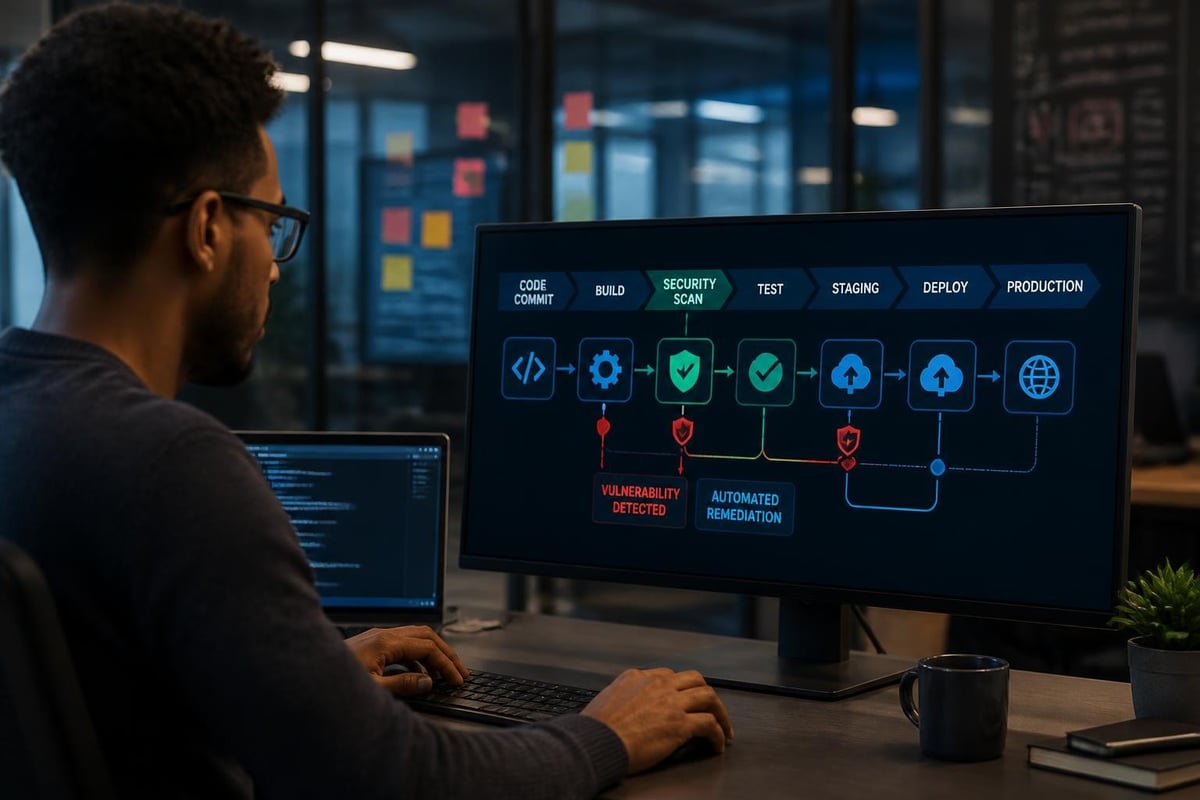
A typical CI/CD workflow includes these stages:
**Source control trigger**: Developer commits code to a branch
**Build stage**: Automated compilation and artifact creation
**Test stage**: Unit, integration, and functional test execution
**Security scanning**: SAST/DAST analysis and dependency checks
**Staging deployment**: Automated release to pre-production environment
**Validation**: Smoke tests and monitoring checks
**Production deployment**: Controlled rollout to live environment
**Post-deployment monitoring**: Automated health checks and rollback triggers
[Dependency caching](https://github.com/github/docs/blob/main/content/actions/reference/workflows-and-actions/dependency-caching.md) optimizes pipeline performance by storing frequently used libraries and dependencies, reducing build times from minutes to seconds in many cases.
Automated Testing Frameworks
Testing automation represents perhaps the highest-value application of code automation. Manual testing simply cannot keep pace with modern release velocities, and human testers inevitably miss edge cases that automated suites catch reliably.
Testing Type
Automation Approach
Typical Tools
Unit Testing
Developer-written tests for individual functions
JUnit, pytest, Jest, NUnit
Integration Testing
API and service interaction validation
Postman, REST Assured, Pact
UI/E2E Testing
Browser automation for user workflows
Selenium, Playwright, Cypress
Performance Testing
Load and stress testing under simulated traffic
JMeter, Gatling, k6
Security Testing
Vulnerability scanning and penetration testing
OWASP ZAP, Burp Suite, Snyk
Modern testing frameworks incorporate AI capabilities to generate test cases, identify flaky tests, and optimize test suite execution order. This intelligent test automation reduces maintenance burden while improving coverage.
Infrastructure as Code
Infrastructure automation treats servers, networks, and cloud resources as programmable entities defined in version-controlled code. Tools like Terraform, CloudFormation, Ansible, and Pulumi allow teams to provision entire environments through declarative specifications.
**Benefits of infrastructure as code:**
**Consistency**: Identical environments across development, staging, and production
**Repeatability**: Destroyed environments can be recreated in minutes
**Version control**: Infrastructure changes tracked just like application code
**Disaster recovery**: Complete system restoration from code repositories
**Cost management**: Automated resource cleanup and optimization
This approach eliminates configuration drift and the "works on my machine" problem that plagues manually configured systems. When infrastructure is code, entire data centers can be replicated with a single command.
Advanced Automation Strategies for 2026
AI-Powered Code Generation and Maintenance
Artificial intelligence has fundamentally changed code automation capabilities in 2026. Large language models now assist with generating boilerplate code, writing tests, refactoring legacy systems, and even fixing bugs autonomously.
Research on [AI-driven automated program repair](https://arxiv.org/abs/2411.07586) demonstrates that modern models can successfully fix 30-40% of common software defects without human intervention. While not replacing developers, these tools accelerate development by handling routine coding tasks.
**Practical AI automation applications include:**
Automated pull request reviews with contextual feedback
Test case generation based on code changes
Documentation generation from code comments and logic
Code translation between programming languages
Security vulnerability patching with automated fixes
Refactoring suggestions based on code smell detection
Teams implementing [LLM-based coding agents](https://arxiv.org/abs/2508.00083) report productivity gains of 20-35% for certain development tasks, particularly in areas like API integration code generation and data transformation scripts.
DevSecOps and Security Automation
Security cannot be an afterthought bolted onto automated pipelines. [DevSecOps practices](https://devguide.owasp.org/en/09-operations/01-devsecops/) integrate security testing and validation at every stage of the development lifecycle through automated controls.
The [NIST Secure Software Development Framework](https://csrc.nist.gov/pubs/sp/800/218/final) provides comprehensive guidance on automating security practices across the SDLC. Key automation opportunities include:
**Static Application Security Testing (SAST)**: Automated code analysis detecting vulnerabilities before compilation
**Dynamic Application Security Testing (DAST)**: Runtime testing of deployed applications for exploitable weaknesses
**Software Composition Analysis (SCA)**: Automated dependency scanning for known CVEs
**Infrastructure scanning**: Automated configuration checks against security benchmarks
**Secrets management**: Automated detection and rotation of API keys and credentials
**Compliance validation**: Automated policy enforcement for regulatory requirements
Organizations serious about security automate these checks as mandatory gates in their pipelines. Failed security scans automatically block deployment, preventing vulnerable code from reaching production.
CRM and Business System Automation
While much code automation discussion focuses on application development, organizations also automate business systems that depend on custom code and integrations. CRM platforms like HubSpot increasingly rely on automated workflows that connect sales, marketing, and service operations.
For teams managing complex business systems, [HubSpot Integrations](https://www.revioco.com/services/integrations) enable code automation that synchronizes data between platforms, triggers workflows based on customer actions, and maintains data consistency across tools. These API-level integrations automate processes that previously required manual data entry or CSV exports.
Revenue operations teams benefit particularly from automation that handles lead routing, deal stage progression, data enrichment, and reporting. When [pipeline automation](https://www.revioco.com/news/ai-pipeline) runs on reliable code rather than manual processes, businesses gain predictability and scalability that manual operations cannot match.
Implementation Best Practices
Starting Your Automation Journey
Organizations new to code automation should follow a phased approach rather than attempting comprehensive automation immediately. The most successful implementations begin with high-value, low-risk processes before expanding to more complex scenarios.
**Recommended implementation sequence:**
**Phase 1**: Automate build processes and basic unit tests
**Phase 2**: Add automated deployment to development/staging environments
**Phase 3**: Implement integration testing and security scanning
**Phase 4**: Automate production deployments with feature flags
**Phase 5**: Add advanced monitoring, auto-scaling, and self-healing capabilities
Each phase should demonstrate clear value before moving forward. Teams that try to automate everything simultaneously often create brittle, unmaintainable systems that generate more problems than they solve.
Measuring Automation Effectiveness
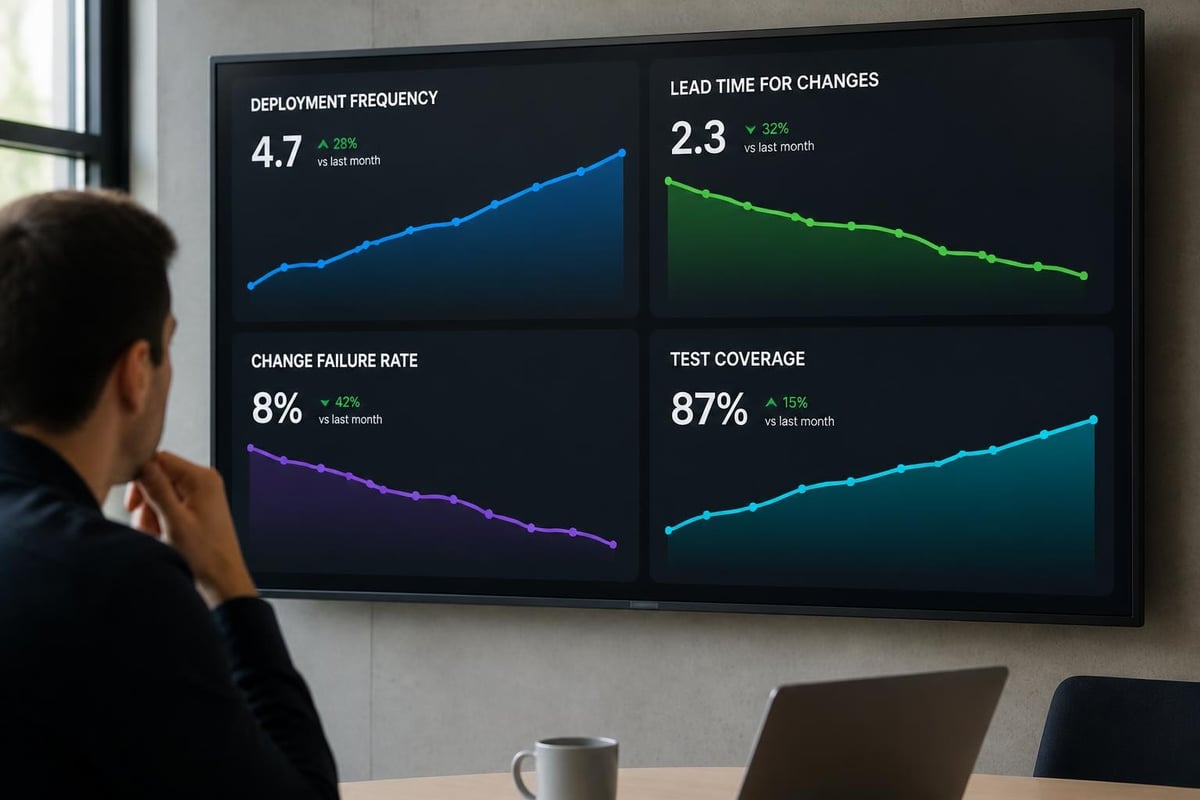
Automation initiatives require metrics to assess impact and identify improvement opportunities. Leading organizations track these key performance indicators:
Metric
Definition
Target Range
Deployment Frequency
How often code reaches production
Daily to weekly
Lead Time
Time from commit to production deployment
< 1 hour
Mean Time to Recovery
Average time to restore service after incidents
< 1 hour
Change Failure Rate
Percentage of deployments causing incidents
< 15%
Test Coverage
Percentage of code covered by automated tests
80%
Pipeline Success Rate
Percentage of pipelines completing without errors
95%
Teams should establish baseline measurements before automation initiatives, then track improvements over time. The [Thoughtworks Technology Radar](https://www.thoughtworks.com/content/dam/thoughtworks/documents/radar/2025/04/tr_technology_radar_vol_32_en.pdf) provides additional guidance on measuring and optimizing automation practices.
Common Pitfalls and How to Avoid Them
Even experienced teams encounter challenges when implementing code automation. Understanding common failure modes helps organizations avoid costly mistakes.
**Over-automation**: Automating processes that require human judgment or change frequently creates maintenance nightmares. Not every manual task justifies automation. Focus on repetitive, well-defined processes with clear success criteria.
**Insufficient testing of automation**: Automated systems require testing just like application code. Teams that skip testing their CI/CD pipelines discover issues when critical deployments fail. Validate automation workflows in non-production environments before relying on them for production releases.
**Ignoring security**: Fast deployment pipelines that skip security checks simply automate the delivery of vulnerabilities to production. Security automation must be non-negotiable, even if it slightly slows release velocity.
**Poor error handling**: Automation that fails silently or generates unclear error messages wastes time during troubleshooting. Invest in comprehensive logging, notifications, and failure recovery mechanisms.
**Configuration complexity**: Overly complex automation configurations become unmaintainable as team members struggle to understand intricate workflows. Keep automation logic simple and well-documented.
Building a Sustainable Automation Culture
Team Skills and Training
Successful code automation requires teams with specific technical skills. Organizations should invest in training developers on CI/CD platforms, infrastructure-as-code tools, and automation best practices.
**Critical skills for automation teams:**
Version control systems (Git, branching strategies)
CI/CD platforms (GitHub Actions, GitLab CI, Jenkins)
Infrastructure-as-code tools (Terraform, CloudFormation)
Containerization and orchestration (Docker, Kubernetes)
Scripting languages (Python, Bash, PowerShell)
Testing frameworks and methodologies
Security scanning and remediation
Monitoring and observability platforms
Teams maintaining [revenue operations systems](https://www.revioco.com/services/managed-revenue-systems) need similar automation skills applied to business platforms rather than pure software development. Understanding API integrations, workflow logic, and data synchronization becomes crucial for CRM automation success.
Documentation and Knowledge Sharing
Automation systems represent organizational knowledge captured in code. Without proper documentation, this knowledge remains locked away, accessible only to the original creators.
Effective automation documentation includes:
**Architecture diagrams**: Visual representations of pipeline flows and system interactions
**Configuration guides**: Explanations of environment variables, secrets, and parameters
**Runbooks**: Step-by-step procedures for common operations and troubleshooting
**Decision logs**: Rationale for architectural choices and tool selections
**Change logs**: History of automation modifications and their impacts
Organizations should treat automation documentation with the same rigor as application documentation. When team members leave or processes evolve, comprehensive documentation ensures continuity and knowledge transfer.
Governance and Control
While automation eliminates manual gates, it requires governance frameworks to prevent chaos. Organizations need clear policies around who can modify automation workflows, what testing is required before changes go live, and how to handle emergency situations.
**Automation governance components:**
**Change approval processes**: Review requirements for pipeline modifications
**Role-based access controls**: Permissions defining who can trigger deployments
**Audit logging**: Complete records of all automated actions for compliance
**Rollback procedures**: Documented processes for reverting problematic changes
**Exception handling**: Protocols for manual intervention when automation fails
Teams working with [data and CRM systems](https://www.revioco.com/news/data-and-crm) need especially rigorous governance around automation that modifies customer records or financial data. The consequences of automation errors in these systems can be severe, requiring careful controls and validation.
Future Directions in Code Automation
Autonomous Development Systems
The frontier of code automation extends toward fully autonomous development systems where AI agents handle increasingly complex programming tasks with minimal human oversight. In 2026, we're seeing early production deployments of systems that automatically triage bugs, generate fixes, create test coverage, and even refactor legacy code.
These systems don't replace developers but augment their capabilities. Junior developers gain expert-level automation assistance, while senior developers offload routine tasks to focus on architectural decisions and complex problem-solving.
Self-Healing Infrastructure
Modern automation systems increasingly incorporate self-healing capabilities that detect and remediate issues without human intervention. When monitoring detects anomalies, automated responses can restart services, scale resources, redirect traffic, or roll back deployments.
The combination of observability platforms, automation frameworks, and AI-driven decision-making creates infrastructure that maintains itself. Organizations report dramatic reductions in mean time to recovery when self-healing automation handles common failure scenarios.
Cross-Platform Orchestration
As businesses adopt diverse technology stacks, automation must orchestrate across platforms rather than operating in silos. Modern automation frameworks coordinate actions across cloud providers, on-premises systems, SaaS applications, and edge computing environments.
This orchestration becomes particularly important for organizations managing [integrated business systems](https://www.revioco.com/news/ai-automation-services) where customer data flows between marketing automation, CRM, billing systems, and analytics platforms. Automation that maintains data consistency and triggers appropriate workflows across these platforms creates seamless customer experiences.
Selecting the Right Tools
Evaluating Automation Platforms
The automation tools landscape offers hundreds of options spanning different use cases and maturity levels. Rather than selecting tools based solely on popularity or vendor marketing, organizations should evaluate platforms against specific criteria.
**Platform selection criteria:**
**Integration ecosystem**: Native connections to your existing technology stack
**Scalability**: Ability to handle your current and projected workload
**Learning curve**: Time required for team proficiency
**Cost structure**: Total cost of ownership including licenses, infrastructure, and maintenance
**Community support**: Availability of documentation, forums, and third-party resources
**Vendor stability**: Financial health and long-term viability of the provider
**Compliance support**: Built-in capabilities for regulatory requirements
Teams should prototype with candidate platforms using realistic workloads before committing to enterprise-wide adoption. A tool that works well for a simple demo may fail under production complexity.
Open Source vs. Commercial Solutions
Both open-source and commercial automation tools have legitimate roles in enterprise environments. The optimal choice depends on organizational capabilities, support requirements, and long-term strategy.
Factor
Open Source
Commercial
Initial Cost
Free (software license)
Paid subscriptions or licenses
Support
Community-driven, variable quality
Vendor-provided SLAs
Customization
Full access to source code
Limited to vendor-provided options
Maintenance
Internal team responsibility
Vendor-managed updates
Innovation Speed
Rapid, community-driven
Controlled, vendor-managed
Enterprise Features
May require custom development
Built-in, vendor-tested
Many organizations adopt hybrid approaches, using open-source tools for core automation while purchasing commercial platforms for specialized needs like security scanning or compliance reporting. This balanced strategy captures benefits from both models while managing risks.
—-
Code automation has matured from an experimental practice into a business-critical capability that determines organizational competitiveness in 2026. The convergence of AI, cloud-native architectures, and DevSecOps practices creates unprecedented opportunities to eliminate manual work, accelerate delivery, and improve software quality. For businesses managing complex systems spanning development, operations, and revenue platforms, professional automation implementation ensures reliable, scalable growth. [Revio](https://revioco.com) helps organizations build automated workflows that connect HubSpot with their broader technology ecosystem, creating the reliable data flows and process automation that modern revenue operations demand.
Put good ideas to work in your business.
We build practical AI systems around your customers, your team and the work that helps your business grow.