Fresh thinking for
growing businesses.
Ideas, practical guides and lessons on connecting sales, improving customer relationships and building systems that grow revenue.
HubSpot
CRM and Automation: The Ultimate Guide for 2026
· 16 min read
Modern businesses face an impossible choice: deliver personalized, timely experiences to every customer or drown in manual work. Fortunately, combining CRM platforms with intelligent automation eliminates this trade-off. When implemented correctly, crm and automation transform scattered customer data and repetitive tasks into a unified revenue engine that scales without adding headcount. This guide explores how businesses in 2026 are leveraging automation within their CRM systems to accelerate growth, improve customer experiences, and empower their teams to focus on high-value work.
What CRM and Automation Actually Means
CRM and automation represents the integration of customer relationship management platforms with workflow automation, triggered actions, and intelligent decision-making. Rather than treating your CRM as a static database, automation turns it into an active system that routes leads, updates records, sends communications, and alerts team members based on customer behavior and predefined rules.
At its core, a CRM stores customer and prospect data: contact information, interaction history, deal stages, support tickets, and engagement metrics. Automation adds the "what happens next" layer. When a prospect downloads a whitepaper, automation can assign them to a sales rep, add them to a nurture sequence, and calculate a lead score. When a deal closes, automation can create onboarding tasks, trigger invoicing workflows, and update revenue forecasts.
The power emerges from connecting these capabilities. Your CRM becomes the single source of truth while automation ensures that truth drives action across your entire organization. Sales reps no longer waste time on data entry. Marketing teams can execute sophisticated campaigns without manual list management. Customer success managers receive alerts before churn risks escalate.
The Business Case for Combining CRM and Automation
Organizations that properly implement crm and automation report measurable improvements across key metrics. Lead response times drop from hours to minutes. Sales cycles shorten as prospects receive relevant information at precisely the right moment. Customer lifetime value increases because automated workflows ensure consistent, timely engagement throughout the customer journey.
According to Forrester's analysis of CRM evolution, automation reshapes not just customer interactions but also employee workflows and buying criteria. Teams spend less time on administrative work and more time building relationships and solving complex problems.
The financial impact extends beyond efficiency gains. Revenue becomes more predictable when automated workflows move deals through standardized stages. Forecasting accuracy improves when pipeline data updates automatically rather than relying on manual input. Customer retention rates climb when automation ensures no customer falls through the cracks between departments.

Core Automation Capabilities Every CRM Should Deliver
Modern CRM platforms offer automation capabilities that range from simple to sophisticated. Understanding these layers helps you build a roadmap that starts with quick wins and scales toward advanced orchestration.
Lead Routing and Assignment
Automated lead distribution ensures prospects reach the right person immediately. Rules can account for geography, company size, industry, product interest, lead score, or current team capacity. Round-robin assignment prevents territory disputes while ensuring balanced workloads. When setting up your CRM properly, lead routing automation should be among the first workflows you configure.
Advanced routing incorporates time-based logic. If a lead arrives outside business hours, automation can queue it for the next morning or distribute it to team members in other time zones. If a rep doesn't respond within a threshold period, automation can reassign the lead or escalate it to management.
Email Sequences and Nurture Campaigns
Email automation represents one of the most widely adopted CRM automation use cases. Sequences trigger based on contact properties, list membership, or specific actions. A prospect who attends a webinar enters one sequence. A customer who hasn't logged in for thirty days enters a different one.
Effective email automation balances personalization with scale. Merge fields insert names, company details, and relevant data points. Dynamic content displays different messages based on segment, industry, or stage. Branching logic adapts the sequence based on engagement: if someone clicks a pricing link, they receive different follow-ups than someone who ignored the email entirely.
Automation Type | Trigger Example | Action Example | Business Impact |
|---|---|---|---|
Lead Routing | Form submission | Assign to territory rep | Faster response time |
Email Sequence | Deal stage change | Send stakeholder content | Shorter sales cycle |
Task Creation | Contract signed | Create onboarding tasks | Consistent customer experience |
Data Enrichment | Contact created | Append firmographic data | Better segmentation |
Workflow Automation and Multi-Step Processes
Workflows orchestrate complex business processes that span multiple steps, conditions, and systems. When a deal moves to "Closed Won," a workflow might create a project in your project management system, generate an invoice in your billing platform, notify your fulfillment team, schedule a kickoff call, and add the customer to your quarterly business review calendar.
Conditional branching allows workflows to adapt based on data. High-value deals trigger executive involvement. International customers enter localized onboarding processes. Product-specific purchases create relevant training sequences. This adaptability ensures automation enhances rather than constrains your business processes.
Data Management and Hygiene
Automation maintains data quality without manual oversight. Duplicate detection rules prevent redundant records. Format standardization ensures phone numbers, addresses, and company names follow consistent patterns. Required field validation blocks incomplete records from advancing through your pipeline.
Scheduled workflows perform ongoing maintenance. Weekly jobs identify and merge duplicates. Monthly processes archive inactive contacts. Quarterly reviews flag outdated information for verification. These automated housekeeping tasks prevent the gradual data decay that undermines CRM effectiveness. Learn more about maintaining data quality in your CRM to ensure automation works reliably.
Integrating AI with CRM and Automation
Artificial intelligence adds a predictive, adaptive layer to traditional rule-based automation. While conventional automation follows "if this, then that" logic, AI-powered automation learns from patterns, predicts outcomes, and adapts recommendations based on changing conditions.
Predictive Lead Scoring
AI analyzes historical data to identify which characteristics and behaviors correlate with conversion. Rather than manually assigning point values to activities, machine learning models calculate lead scores based on hundreds of variables: email engagement patterns, website behavior, firmographic fit, technographic signals, and timing factors.
These scores update continuously as new information arrives. A lukewarm lead who suddenly visits your pricing page five times in one day receives an immediate score boost and triggers an alert to sales. According to research from MIT Sloan on AI applications, organizations using predictive scoring see significant improvements in conversion rates and sales efficiency.
Intelligent Content Recommendations
AI determines which content, offers, or messages will resonate with each contact based on their profile and behavior. Rather than sending the same case study to everyone in an industry segment, intelligent automation selects the specific story most likely to advance each individual prospect.
Recommendation engines analyze engagement history, similar customer profiles, and content performance data. They test variations and learn which approaches work best for different personas and stages. This creates genuinely personalized experiences at scale-something Harvard Business Review identifies as essential for modern customer engagement.
Conversational AI and Chatbots
AI-powered chat interfaces qualify leads, answer common questions, schedule meetings, and route conversations to appropriate team members. Natural language processing understands intent even when prospects phrase questions differently than your knowledge base articles.
Advanced implementations go beyond simple FAQ responses. Chatbots can access CRM data to provide account-specific information, update records based on conversation content, and hand off seamlessly to human agents with full context. The AI component learns from successful interactions, gradually improving response accuracy and coverage.

Building Your CRM and Automation Strategy
Successful implementation requires strategy before tactics. Organizations that jump directly into building workflows without proper planning end up with disconnected automations that create more problems than they solve.
Map Your Customer Journey and Internal Processes
Start by documenting how prospects and customers move through your business. Identify every touchpoint, handoff, and decision point. Note where delays occur, where data gets lost, and where manual work creates bottlenecks.
This mapping reveals your highest-impact automation opportunities. Perhaps leads sit unassigned for hours after form submissions. Maybe sales reps spend thirty minutes daily updating deal stages. Or customer success teams lack visibility into product usage patterns that predict churn. These pain points become your automation priorities.
When examining common CRM implementation mistakes, undefined processes consistently appear at the top of the list. Automation built on unclear processes simply scales confusion.
Define Clear Objectives and Success Metrics
Establish specific, measurable goals for your crm and automation initiative. Reducing lead response time from four hours to fifteen minutes is actionable. "Improving efficiency" is not. Increasing email sequence conversion rates by twenty percent creates accountability. "Better nurturing" does not.
Your metrics should align with business outcomes, not just activity. Open rates matter less than qualified opportunities generated. Number of workflows created matters less than revenue influenced by automated touchpoints. Focus on metrics that connect automation directly to growth, retention, or cost reduction.
Start Simple and Scale Systematically
Begin with foundational automations that deliver quick wins and build team confidence. Lead routing, welcome emails, and task creation provide immediate value with minimal complexity. These early successes create momentum and demonstrate ROI before tackling sophisticated multi-system orchestrations.
Each automation should solve one problem well before adding complexity. Test thoroughly with small groups before rolling out broadly. Monitor results closely during the first thirty days. Gather feedback from users and refine based on real-world performance. This iterative approach prevents the "automate everything" trap that creates brittle, unmaintainable workflows.
Establish Governance and Ownership
Assign clear ownership for automation strategy, implementation, and ongoing optimization. Without dedicated responsibility, automation initiatives stall when competing priorities emerge. Depending on your organization size, this might be a dedicated revenue operations team, a CRM administrator, or distributed ownership across sales, marketing, and customer success leaders.
Create documentation standards for every automation. Future team members need to understand what workflows exist, what they do, why they were built, and how to modify them safely. Establish a testing environment where changes can be validated before affecting live customer interactions. According to CIO.com's CRM best practices, governance and change management separate successful implementations from failed ones.
Advanced CRM and Automation Patterns
Once foundational automations run smoothly, advanced patterns unlock even greater value. These approaches require mature processes, clean data, and often involve multiple integrated systems.
Cross-System Orchestration
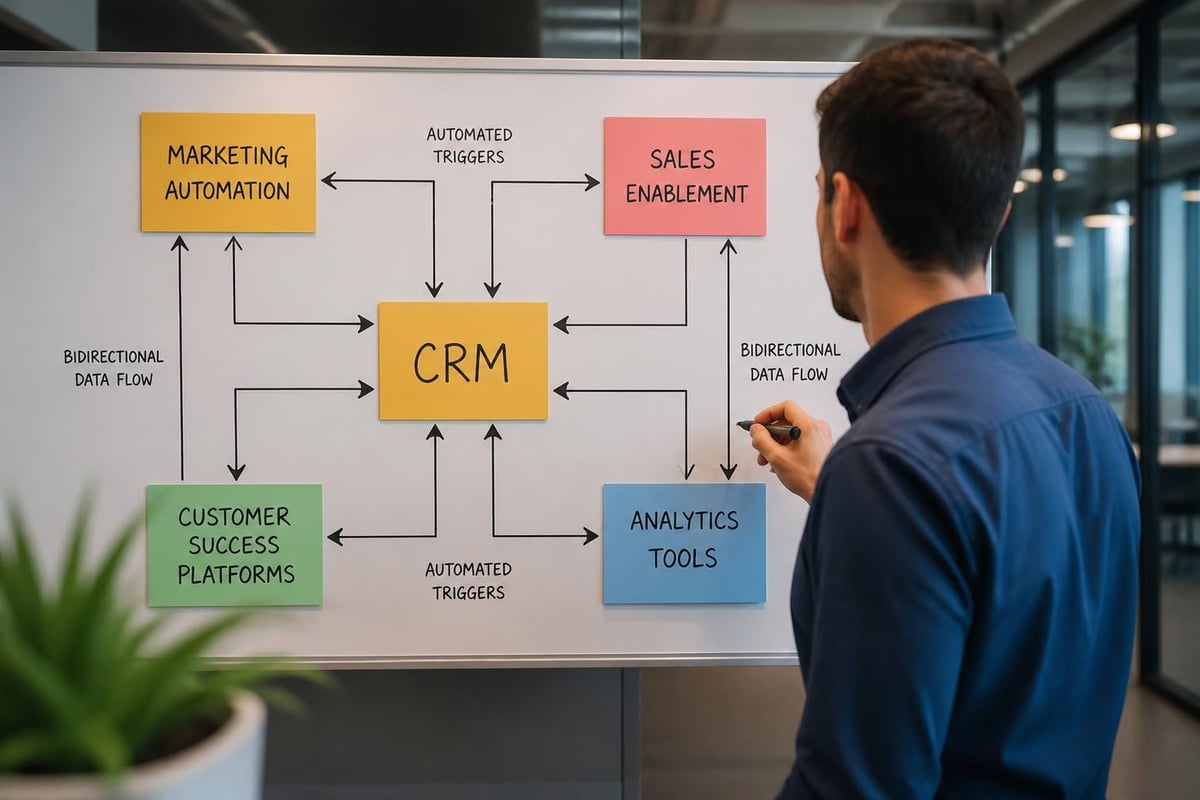
Modern businesses run on interconnected tools: CRM, marketing automation, customer support, billing, project management, and analytics platforms. Cross-system automation ensures data flows bidirectionally and actions in one system trigger appropriate responses in others.
When a support ticket escalates to critical priority, automation can create a CRM task for the account executive, post an alert in Slack, and adjust the customer health score. When a customer's usage drops below a threshold, automation can trigger outreach from customer success and adjust renewal forecast probability. HubSpot integrations make these complex workflows possible by connecting your core systems reliably.
Integration Scenario | Systems Connected | Automated Action | Business Benefit |
|---|---|---|---|
Quote to Cash | CRM + Billing + ERP | Deal closes → Invoice generates → Fulfillment begins | Faster revenue recognition |
Support to Sales | Help Desk + CRM | High-value customer ticket → Account exec notification | Proactive relationship management |
Marketing to Product | CRM + Product Analytics | Trial user hits feature milestone → Upgrade nurture sequence | Conversion optimization |
Sales to Operations | CRM + Project Management | Contract signed → Project created with scope details | Seamless handoff |
Account-Based Marketing Automation
ABM strategies require coordinating personalized outreach across multiple stakeholders within target accounts. Automation tracks engagement at both the contact and account level, orchestrating sequences that adapt based on collective account behavior.
When any stakeholder from a target account visits your pricing page, automation can alert the assigned account executive and adjust messaging to other contacts within that organization. When multiple stakeholders engage with related content, automation can trigger account-level scoring updates and orchestrate coordinated outreach. This level of sophistication requires robust data models and careful workflow design.
Revenue Attribution and Reporting Automation
Understanding which marketing touchpoints, sales activities, and customer success interventions drive revenue requires connecting data across the entire customer lifecycle. Automated attribution models track and credit interactions according to your chosen methodology: first touch, last touch, multi-touch, or custom weightings.
Reporting automation ensures stakeholders receive relevant insights without manual report generation. Executives receive weekly pipeline snapshots. Sales managers get daily team performance summaries. Marketing leaders track campaign ROI in real-time dashboards. Automated alerts notify relevant parties when metrics exceed thresholds-forecasts missing targets, pipeline velocity slowing, or conversion rates dropping.
Predictive Pipeline Management
AI-powered automation can forecast pipeline outcomes with greater accuracy than manual methods. Machine learning models analyze historical patterns to predict which deals will close, which will slip, and which require intervention. Automation routes at-risk opportunities to managers for coaching and flags stalled deals for re-engagement campaigns.
These predictions improve over time as models learn from actual outcomes. Early iterations might achieve modest accuracy improvements, but continuous learning gradually enhances predictive power. Organizations implementing this approach report more accurate forecasts and higher win rates as reps focus effort where it matters most.
Implementation Best Practices and Common Pitfalls
Even well-designed automation strategies fail without proper execution. Understanding common pitfalls helps you avoid expensive mistakes and accelerated time-to-value.
Data Quality as the Foundation
Automation amplifies whatever data exists in your system. Incomplete records create broken workflows. Inaccurate information sends messages to wrong people. Duplicate contacts trigger redundant outreach that damages customer experience. Before implementing sophisticated automation, invest in data cleanup and ongoing quality processes.
Establish required fields for key objects. Implement validation rules that enforce proper formatting. Create deduplication workflows that merge redundant records automatically. These foundational data practices ensure your automation operates on reliable information. Expert-led HubSpot onboarding includes proper data structure configuration so automation works correctly from day one.
Testing Before Deployment
Every automation should undergo thorough testing before affecting real customers. Create test contacts and companies that represent different scenarios: various industries, deal sizes, engagement levels, and lifecycle stages. Run automations against these test records and verify every branch, condition, and action performs as intended.
Test error handling specifically. What happens when expected data is missing? How does automation behave when integrated systems are temporarily unavailable? Robust automations include error notifications and graceful degradation rather than silent failures that compound over time.
Balancing Automation with Human Touch
The goal isn't to remove humans from customer interactions-it's to free them from repetitive work so they can focus on high-value conversations. Over-automation creates impersonal experiences that damage relationships. Under-automation wastes time on tasks technology handles better.
Find the right balance by automating routine acknowledgments, data updates, and scheduling while preserving human involvement for complex discussions, negotiations, and relationship building. Let automation handle the "when" and "who" while humans determine the "how" and "why" of important interactions.
Privacy and Compliance Considerations
Automated systems that process personal data must comply with regulations like GDPR, CCPA, and industry-specific requirements. Automation that triggers based on behavioral data or creates automated decisions about individuals raises specific compliance considerations. According to IAPP guidance on data analytics, organizations need clear legal basis for automated processing and must respect individual rights.
Build consent management into your automation strategy. Respect opt-out preferences across all channels. Maintain audit logs that document automated decisions. Include human review checkpoints for high-impact automated actions. These compliance safeguards protect both your customers and your organization.
Measuring and Optimizing CRM and Automation Performance
Implementation is just the beginning. Continuous measurement and optimization ensure your automation delivers sustained value as your business evolves.
Key Performance Indicators for Automation
Track metrics that connect automation directly to business outcomes:
Lead response time: How quickly do automated routing and notifications get leads to the right person?
Conversion rates by stage: Do automated nurture sequences improve progression through your pipeline?
Rep productivity: How many hours do automated workflows save weekly per team member?
Customer satisfaction: Do automated touchpoints maintain or improve CSAT and NPS scores?
Revenue velocity: Does automation accelerate time-to-close and increase deal sizes?
Monitor both automation-specific metrics (workflow completion rates, email deliverability) and business outcomes. A perfectly functioning automation that doesn't impact revenue or experience provides little value.
Continuous Improvement Cycles
Establish quarterly reviews of automation performance. Analyze which workflows deliver strong ROI and which underperform. Gather feedback from sales, marketing, and customer success teams about automation pain points and opportunities.
Look for patterns in failed workflows or error logs. Common failures indicate areas needing refinement. Track when team members manually override or bypass automation-these workarounds signal design problems worth addressing.
Test variations systematically. Try different email subject lines in sequences. Adjust lead scoring thresholds and measure impact on sales qualified lead quality. Modify routing logic and track effects on conversion rates. This experimental approach gradually optimizes automation effectiveness.
Adapting to Business Changes
Your automation must evolve as products, markets, and strategies shift. New product launches require updated nurture content and revised scoring models. Market expansions need geography-based routing rules and localized messaging. Strategic pivots demand realigned workflows that reflect current priorities.
Schedule regular audits identifying orphaned workflows, outdated content, and automation built for discontinued offerings. Archive rather than delete to preserve institutional knowledge, but ensure active automation reflects current business reality. Understanding how pipeline reporting evolves helps you maintain relevant automation as your revenue model matures.
The Future of CRM and Automation in 2026 and Beyond
The trajectory of crm and automation points toward increasingly intelligent, adaptive systems that require less manual configuration and deliver more personalized experiences. Several trends are reshaping what's possible.
Autonomous Agents and AI Decision-Making
Next-generation systems feature AI agents that monitor situations, evaluate options, and take actions with minimal human intervention. Rather than following predetermined rules, these agents learn optimal responses through reinforcement learning and adapt to changing conditions.
An autonomous agent might monitor a customer account, detect usage patterns indicating expansion opportunity, research the company to understand their current initiatives, identify the best product fit, and initiate personalized outreach-all without human involvement until a meeting is scheduled. Deloitte's workflow automation research indicates these capabilities are moving from experimental to practical faster than most organizations expect.
Hyper-Personalization at Scale
Combining comprehensive customer data with AI-powered automation enables individualized experiences for every contact. Rather than segment-based campaigns, future systems will generate unique content, timing, and channel selections for each person based on their complete interaction history and predicted preferences.
This personalization extends beyond marketing into sales and service. Reps receive AI-generated insights about each prospect's priorities, concerns, and decision-making style. Support agents get recommended solutions based on similar customer situations. Every interaction becomes more relevant and effective.
Unified Customer Data Platforms
The distinction between CRM, marketing automation, customer data platform, and analytics systems continues blurring. Integrated platforms provide single customer views that power automation across all functions. Data silos disappear as information flows seamlessly between systems.
This unification enables sophisticated automation that was previously impossible. Customer success interventions trigger based on combined data from sales conversations, product usage, support interactions, and financial health. Marketing campaigns adapt based on service ticket sentiment and sales pipeline stage. Every team operates from shared context rather than departmental fragments.
CRM and automation has evolved from a nice-to-have efficiency tool into a fundamental requirement for competitive businesses. Organizations that master the combination of robust customer data with intelligent, adaptive automation create scalable revenue engines that deliver consistent customer experiences while empowering teams to focus on strategic work. The key lies in starting with solid foundations, building systematically toward advanced capabilities, and continuously optimizing based on real business outcomes. Revio helps businesses implement and optimize HubSpot CRM with AI-powered automation, building pipeline workflows, data structures, and reporting systems that turn scattered customer data into predictable revenue growth.
Put good ideas to work in your business.
We build practical AI systems around your customers, your team and the work that helps your business grow.